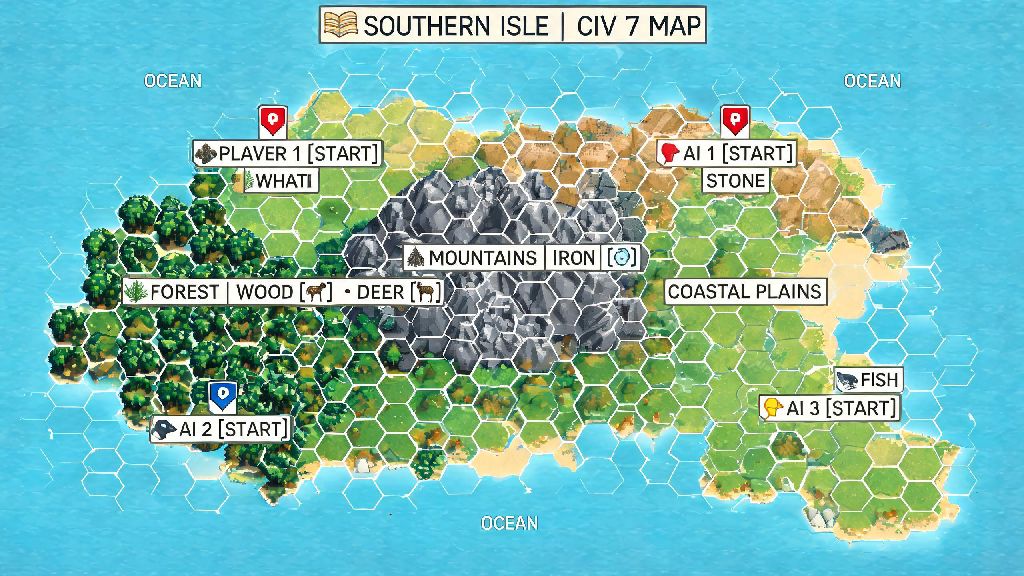
If you’ve ever spawned next to three hostile civs on a tiny island with no food resources in your first 10 turns, you know how much civilization 7 map generation impacts your entire playthrough. It’s not just a random background backdrop — the terrain, resource placement, continent layout, and climate settings can make or break your chances of a science, domination, or culture win before you even place your first city. A lot of new players skip over the pre-game map settings entirely, assuming they’re just minor cosmetic tweaks, but learning to tweak these options lets you tailor every run to your preferred playstyle, no matter if you’re a peaceful builder or a warmonger.
How Core Civilization 7 Map Generation Algorithms Work
Unlike older Civ titles that relied on almost fully random terrain generation, Civ 7 uses a hybrid system that prioritizes fair spawns first before filling in the rest of the world. The algorithm first places all player and AI civ starting positions with a minimum distance between each, and ensures every spawn has at least one food resource and one production tile within the first city’s workable radius. This is why civilization 7 map generation feels much fairer than older entries in the franchise, even when you get a less-than-ideal spawn.
After placing spawns, the algorithm generates continental landmasses based on your selected layout setting, then fills in biomes, rivers, mountains, and natural wonders. Finally, it places luxury, strategic, and bonus resources according to your selected scarcity setting. Key variables that shape the final map include spawn bias settings, continent clustering rules, and resource scarcity sliders, all of which you can adjust manually in the pre-game menu.
You don’t need to understand every line of code behind the system to use it to your advantage, either. Even small tweaks to the publicly available input sliders can drastically change the kind of world you end up playing in.
Best Base Game Settings to Tweak for Your Playstyle
The pre-game map menu has over a dozen adjustable settings, but you don’t have to edit all of them to get a map that fits what you want to play. Every change you make to these sliders adjusts the core inputs that civilization 7 map generation uses to build your world, so even a small tweak to sea level can completely change how continents are laid out. Start with these high-impact settings first before messing with more niche options:
Testing 4 or 5 different map seeds in a row can get tedious fast, especially if you’re looking for a very specific spawn layout for a challenge run. If you want to take a break between testing different map seeds, short, low-stakes casual games are a great way to reset your focus without stepping away from your desk entirely. Lots of players who bounce between 5-minute map generation tests and full play sessions like to use quick, casual games to fill those small gaps, and Slots Winner is a popular pick for those short breaks that don't require a lot of focus or strategy to enjoy. Once you’re refreshed, you can jump right back into tweaking settings and testing seeds without losing your rhythm.
If you’re playing a specific civ with unique bonuses, adjust settings to play to their strengths. For example, if you’re playing as a naval civ, pick a high sea level, island-heavy map to make the most of your ship bonuses. If you’re playing as a science civ, pick a younger world with more mountains to build observatories next to.
Using Custom Seeds and Mods to Expand Civilization 7 Map Generation Options
A lot of players don't realize that you don't have to rely on random civilization 7 map generation results if you want a consistent, fun spawn. Map seeds are unique alphanumeric codes that the game uses to generate a specific world every time, so if you see a streamer or friend share a seed with a perfect spawn (two rivers, three luxuries, and a natural wonder within 3 tiles of spawn, for example), you can enter that code in the pre-game menu to get the exact same map. There are entire community forums dedicated to sharing seeds for every playstyle, from peaceful builder runs to brutal domination challenge runs.
If you want even more variety, modded map scripts add hundreds of new map generation options that aren’t available in the base game. Popular options include real-world Earth maps with accurate country borders and resource placement, post-apocalyptic maps with radioactive wastelands and limited fertile land, and fantasy maps with magical biomes that give unique bonuses to cities built in them. Modded map scripts are easy to install through the official Civ 7 mod menu, and most are updated within days of new game patches dropping.
Just note that if you’re playing multiplayer, all players in the lobby need to have the same map mod installed to avoid desyncs mid-game. If you’re playing with randoms online, stick to base game map settings or clearly list required mods in the lobby description before players join.
Common Map Generation Mistakes to Avoid
Even experienced players make simple mistakes when adjusting map settings that ruin their run before it starts. Most of these mistakes come from not understanding how small changes to input settings impact the final civilization 7 map generation output, and they’re easy to avoid once you know what to look for.
One of the most common mistakes is picking a huge map with 12+ civs if you’re playing on a lower-end PC. The game has to process far more units, cities, and terrain tiles on larger maps, which leads to extreme lag in the late game when every civ has dozens of units moving per turn. Stick to standard or smaller maps if you don’t have a high-end gaming rig to avoid 5-minute turn times later in your run.
Another common mistake is turning off the fair spawn toggle to try to get a better starting position. While you might get lucky and spawn with 4 luxuries in your first tile, it’s just as likely that an AI civ will spawn with an even better position and roll over you in the first 50 turns. The fair spawn toggle exists to level the playing field, and turning it off almost always makes the game less fun, not more.
Finally, don’t forget to adjust barbarian settings to match your map size. Larger maps have far more empty space for barbarian camps to spawn, so if you’re playing a huge map, turn down barbarian aggression slightly to avoid being swarmed by 4+ barbarian raiding parties in the first 20 turns before you have a chance to build an army.
At the end of the day, civilization 7 map generation is one of the most underrated tools you have to make every playthrough feel fresh and tailored to what you enjoy. You don't have to stick to the default settings if they don't fit your playstyle — tweak the sliders, test custom seeds, or try out modded map scripts to get exactly the world you want to build your empire in. Even small changes to your pre-game map settings can make a huge difference in how much fun you have, and how likely you are to pull off that win you've been chasing.